Control Flow
A program often needs to change its behavior to adapt to the situation, for example, “if condition X is true, do thing A; otherwise, do thing B.”
True/False conditions are represented with the Boolean data type, bool.
A variable of type bool can only have one of two values: True or False.
These constants are reserved keywords, and the capitalization matters (so true is not a reserved keyword in Python).
Comparison Operators
Recall that arithmetic operators like + and - act on two operands, one on each side of the operator.
Comparison operators also have two operands but evaluate to True or False.
These are used to evaluate the truth of statements like “is \(a\) less than \(b\)?” or “does \(x\) equal \(y\)?”
Math |
Python |
Examples |
||
|---|---|---|---|---|
\(<\) |
|
|
|
|
\(\le\) |
|
|
|
|
\(=\) |
|
|
|
|
\(\ge\) |
|
|
|
|
\(>\) |
|
|
|
|
\(\neq\) |
|
|
|
|
print(2 < 1)
print(4 == 2)
print(3 >= 3)
print(5 != 10)

# Comparison operators can be used with variables as well.
x = 10
y = 15
print(x == y)
False
False
True
True
False
Single vs Double Equal Signs
One of the most common mistakes in Python is using = instead of == or vice versa.
==is a comparison operator that asks if two values are equal.=assigns variables; it is not a comparison operator.
Conditional Clauses
A conditional statement is a logical True/False statement, usually involving comparison operators.
Conditional statements can be used to create a conditional clause, a group of code that is executed, or not, depending on the True/False value of the conditional statement.
There are three main reserved keywords in Python for creating conditional clauses: if, elif, and else.
IF
An if clause consists of the reserved keyword if, a conditional statement ending in a colon :, followed by indented lines of code.
As with functions, the body of an if clause is indented with four spaces.
Unindented code ends the clause, and execution continues line by line.
if 81 < 100:  # Python checks the comparison `81 < 100` and finds it is True.
    # Because the conditional was True, the following lines are executed.
    print("This is the body of the if clause.")
    print("A clause can be several lines long.")

if 81 > 100:  # Python checks the comparison `81 > 100` and finds it is False.
    # Because the conditional was False, the following lines are NOT executed.
    print("Math is broken!")
    print("PANIC!!!")

# Unindenting ends the clause.
print(81 < 100)  # This line is always executed.
This is the body of the if clause.
A clause can be several lines long.
True
ELIF
Optional elif clauses can follow an if clause.
An elif gives another condition to check, but Python checks it only when the preceding if clause (and any preceding elif clauses) are NOT executed.
The body of the elif clause is executed only if its own conditional statement is True.
x = 67

if x == 82:         # Conditional is False, so this clause is NOT executed.
    print("Found x, it's 82.")
elif x == 71:       # Conditional is False, so this clause is NOT executed.
    print("Found x, it's 71.")
elif x == 67:       # Conditional is True, so this clause IS executed!
    print("Found x, it's 67.")
elif x > 0:         # A previous if/elif was executed, so this clause is not executed.
    print("x is positive but not 82, 71, or 67")
Found x, it's 67.
ELSE
An optional else clause can follow if and elif clauses.
The body of an else clause is executed only when the if condition and all preceding elif conditions are False.
print("Is 2^3 less than 3^2?")
if 2**3 < 3**2:                 # This conditional, 8 < 9, is True.
    print("Yes, it is!")        # This line IS executed.
else:
    print("No, it is not.")     # This line is NOT executed.
print("Now we know!")           # Unindenting ends the clause.
Is 2^3 less than 3^2?
Yes, it is!
Now we know!
print("Is 4^5 less than 5^4?")
if 4**5 < 5**4:                 # This conditional, 1024 < 625, is False.
    print("Yes, it is!")        # This line is NOT executed.
elif 4**5 == 5**4:              # This conditional is also False.
    print("No, they're equal!") # This line is NOT executed.
else:
    print("No, it is not.")     # This line IS executed.
print("Good to know.")          # Unindenting ends the clause.
Is 4^5 less than 5^4?
No, it is not.
Good to know.
Nested Clauses
Conditional clauses can be nested, meaning an if clause can be placed in the body of another if clause.
The following example highlights the lines of code that are executed, with different values for the variable in the first line.
x = -3

if x < 10:          # -3 < 10 is True, enter this clause.
    y = 1
    if x < 0:       # -3 < 0 is True, enter this clause.
        y = 0
elif x < 20:        # `if` was already executed, skip `elif`.
    y = 2
    if x > 15:
        y = 3
else:               # `if` was already executed, skip `else`.
    y = 4

print(y)
0
x = 5

if x < 10:          # 5 < 10 is True, enter this clause.
    y = 1
    if x < 0:       # 5 < 0 is False, skip this clause.
        y = 0
elif x < 20:        # `if` was already executed, skip `elif`.
    y = 2
    if x > 15:
        y = 3
else:               # `if` was already executed, skip `else`.
    y = 4

print(y)
1
x = 12

if x < 10:          # 12 < 10 is False, skip this clause.
    y = 1
    if x < 0:
        y = 0
elif x < 20:        # 12 < 20 is True, enter this clause.
    y = 2
    if x > 15:      # 12 > 15 is False, skip this clause.
        y = 3
else:               # `elif` was already executed, skip `else`.
    y = 4

print(y)
2
x = 18

if x < 10:          # 18 < 10 is False, skip this clause.
    y = 1
    if x < 0:
        y = 0
elif x < 20:        # 18 < 20 is True, enter this clause.
    y = 2
    if x > 15:      # 18 > 15 is True, enter this clause.
        y = 3
else:               # `elif` was already executed, skip `else`.
    y = 4

print(y)
3
x = 26

if x < 10:          # 26 < 10 is False, skip this clause.
    y = 1
    if x < 0:
        y = 0
elif x < 20:        # 26 < 20 is False, skip this clause.
    y = 2
    if x > 15:
        y = 3
else:               # `if` and `elif` were skipped, enter this clause.
    y = 4

print(y)
4
Conditional clauses can also be used in function definitions.
def relu(x):
    """Return 0 if x < 0; return x otherwise."""
    if x < 0:
        y = 0
    else:
        y = x
    return y
This logic can be implemented a little more elegantly by using multiple return statements.
def relu(x):
    """Return 0 if x < 0; return x otherwise."""
    if x < 0:
        return 0
    return x
Whichever return statement is executed first is used as the return value; once a return is executed, the function exits and execution immediately resumes at the line of code that called the function.
Problem 6
Consider the following piecewise function.
The graph of \(f(x)\) is displayed below.
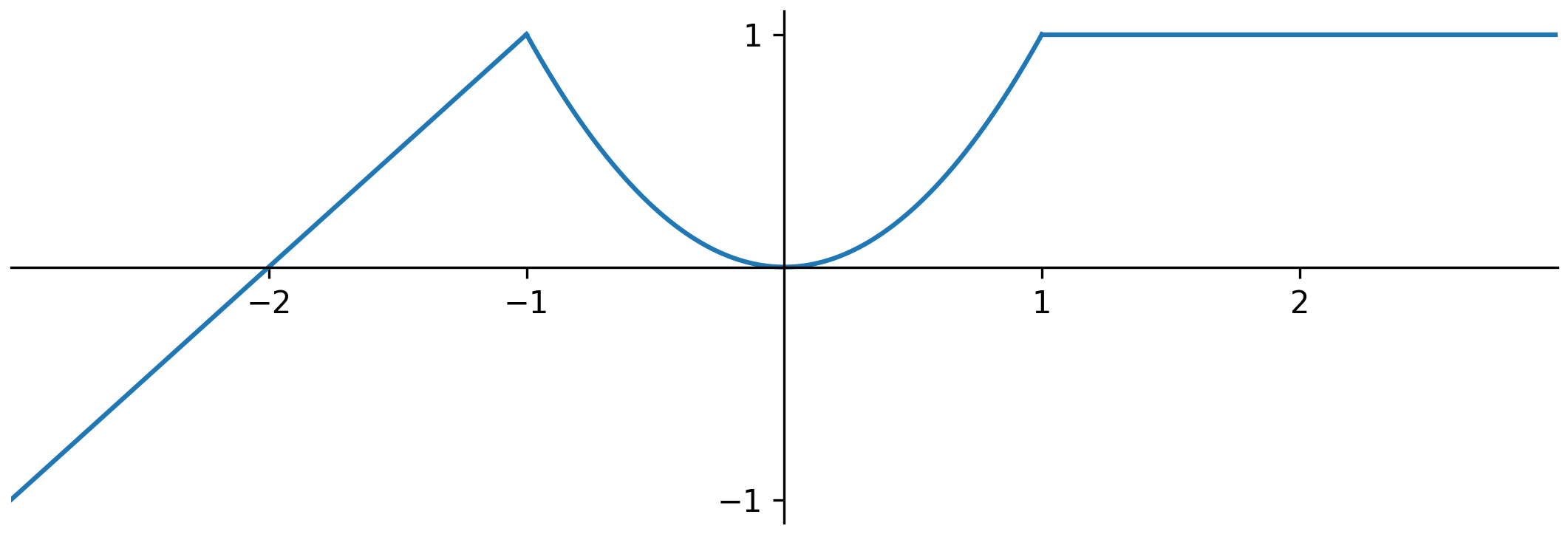
Write a function named piecewise() that accepts a single argument representing \(x\) and returns the value of \(f(x)\).
Test Cases
print(piecewise(-1.5))
print(piecewise(0.0))
print(piecewise(0.5))
print(piecewise(3000))
0.5
0.0
0.25
1.0
Boolean Operators
Conditional statements can be combined with the Boolean operators and, or, and not.
This makes it possible to make more complicated logical statements.
|
|
|
|
|
|
|---|---|---|---|---|---|
AND
The statement x and y is True when both x and y are True.
x = 18

if x < 20 and x >= 19:
    print("x is between 19 and 20")

if x < 20 and x > 15:
    print("x is between 15 and 20")
x is between 15 and 20
OR
The statement x or y is True when at least one of x and y is True.
x = 18

if x < 0 or x > 20:
    print("x is either negative or bigger than 20")

if x < 20 or x > 50:
    print("x is less than 20 or bigger than 50")
x is less than 20 or bigger than 50
NOT
The statement not x is True when x is False.
x = 10

if not x < 0:
    print("x is not negative")
x is not negative
Quick Check
What will be the output of the following code?
 1x = 7
 2y = 3
 3
 4if x > 10 or y > 10:
 5    z = 1
 6elif x > 5 and y > 5:
 7    z = 2
 8    if not (x > y):
 9        z = 3
10    else:
11        z = 4
12elif not (x == y):
13    z = 5
14    if x > y and not (y < 0):
15        z = 6
16    else:
17        z = 0
18else:
19    z = 8
20
21print(z)
Answer
6
Here is the logical flow.
Line 4:
x > 10andy > 10are bothFalse, sox > 10 or y > 10isFalse.Line 6:
x > 5isTrue, buty > 5isFalse, sox > 5 and y > 5isFalse.Line 12:
x == yisFalse, sonot (x == y)isTrue. Execution therefore enters theelifclause.Line 14:
x > yisTrue,y < 0isFalse, sonot (y < 0)isTrueand hencex > y and not (y < 0)isTrue. Execution therefore enters theifclause.Line 15:
z = 6, then execution skips the remainingelseclauses.
Here is another one.
 1x = 7
 2y = 4
 3
 4if x > 20 or (y < 3 and not x < 10):
 5    z = 1
 6elif (x > 10 and y > 2) or not (x <= 7 or y == 4):
 7    z = 2
 8    if not (y > x) and (x + y > 12 or y == 4):
 9        z = 3
10    else:
11        z = 4
12elif x > 5 and (y < 10 or not x == 7):
13    z = 5
14    if (x > 8 or y > 6) and not (x + y == 11):
15        z = 6
16    elif not (y != 4 or x < 7):
17        z = 0
18    else:
19        z = 7
20else:
21    z = 8
22
23print(z)
Answer
0
Can you explain the logical flow?
Problem 7
Recall the creamery from Problem 1 and Problem 4 that has the following menu items.
Box of French fries, $2.49
Guacamole bacon burger, $8.69
Single scoop of ice cream, $3.99
Suppose the creamery has two special deals:
If a customer pays with a special campus card, there is no tax charge.
If, after tax is added, the coupon is subtracted, and the result is rounded to the nearest cent, the total bill is a whole-dollar amount (\(x\) dollars and zero cents), then there is an additional $1.00 discount. For example, if the rounded total after tax and coupon is exactly $5.00, then the cost is decreased to $4.00; if the rounded total is $5.01, there is no special discount.
Write a function named creamery_special() that accepts the following arguments (in order):
The number of boxes of French fries to order.
The number of guacamole bacon burgers to order.
The number of single scoop ice creams to order.
Whether the campus card is used to pay (
Trueif yes,Falseif not).
Calculate the total cost of the order with the given numbers of items: start from the subtotal, add the 7.45% tax unless the campus card is used, subtract the $5.00 coupon, round to the nearest cent, and apply the additional $1.00 special discount if applicable.
If the total is negative after all discounts, return zero. Otherwise, return the total (still rounded to the nearest cent).
Hint 1: The % operator may be useful for the special discount.
print(6.41 % 1)
print(7.92 % 1)
print(8.00 % 1)
0.41000000000000014
0.9199999999999999
0.0
Hint 2: A variable of type bool can be used as the entire conditional of an if clause.
boolean_variable = True

if boolean_variable:
    print("It's True!")
else:
    print("It's False.")
It's True!
Test Cases
print(creamery_special(2, 2, 2, False))  # 2 of each, without the campus card.
print(creamery_special(1, 2, 3, True))   # An order with the campus card.
print(creamery_special(5, 1, 1, False))  # An order with the special discount.
print(creamery_special(2, 3, 5, True))   # An order with the special discount.
print(creamery_special(0, 0, 1, True))   # A subtotal less than the coupon.
27.6
26.84
21.0
45.0
0.0