Typesetting Mathematics
One of LaTeX’s main strengths is its ability to display mathematics clearly and professionally.
Math Mode
In LaTeX, mathematical equations and notation are written in “math mode,” which has two common forms.
Inline math sits inside a line of text and is delimited by
\( ... \)or$ ... $.Displayed math is set on its own centered line and is delimited by
\[ ... \]. The older$$ ... $$delimiter also works in many settings, but\[ ... \]is preferred in LaTeX.
Consider the following LaTeX code, which would be placed within the body of a LaTeX document.
Euler's constant $e \approx 2.71828$ is the special number
such that the derivative of $f(x) = e^x$ is itself:
\[
    f'(x)
    = \frac{d}{dx}[e^x]
    = e^x
    = f(x).
\]
In the compiled PDF, the above LaTeX code renders as follows.


This example uses \approx for \(\approx\), \frac{}{} for fractions, and a few of the following special characters.
Character |
Description |
Example |
|---|---|---|
|
superscripts |
|
|
subscripts |
|
|
small space |
|
|
regular space |
|
|
“prime” tick |
|
Note that curly braces {} are used to enclose groups like superscripts with more than one character.
Aligned Equations
Many calculations require multiple equations over several lines.
The align environment from the amsmath package creates equations in display mode and aligns them at & markers.
Use \\ to start a new line.
% In the preamble.
\usepackage{amsmath}

% ...

\begin{document}

% In the body.
Expanding a square, lined up at the equals signs:
\begin{align}
    (x + 1)^2
    &= (x + 1)(x + 1)
    \\
    &= x^2 + 2x + 1.
\end{align}


Use align* (with an *) to suppress automatic equation numbering, that is, to remove (1) and (2) on the right of each equation.
The equation number for a single line can be suppressed with \nonumber.
Stay Aligned
LaTeX does not require line breaks and indentation like Python does. For example, the following code compiles correctly and renders the same equation as the previous example.
Expanding a square, lined up at the equals signs: \begin{align}
(x + 1)^2 &= (x + 1)(x + 1) \\ &= x^2
+ 2x + 1. \end{align}
Even though it is not required by the language, use reasonable line breaks and indentation to write readable LaTeX code.
Problem 5
Add \usepackage{amsmath} and \usepackage{amssymb} to the preamble of your document.
Then, under Subsection 1.1 (Equations), recreate the following unnumbered equations.


Labels and References
Equations and other page elements can be given a label so they can be referenced automatically later.
Use \label{} within a numbered align environment to create an equation label, and refer to it later with \eqref{}.
Consider the following:
\begin{align}
    \label{eq:exponential-inverses}
    e^{\log(x)}
    &= x,
    \\
    \label{eq:trig-notinverses}
    \sin(\cos(\pi/2))
    &= 0.
\end{align}
Equation~\eqref{eq:exponential-inverses} shows that
the exponential and logarithm are inverses.
On the other hand, equation~\eqref{eq:trig-notinverses} shows that
$\sin(x)$ and $\cos(x)$ are not inverses.


Essential Notation
The following examples contain various useful and common mathematical symbols, several of which are made available through the amsmath and amssymb packages.
Calculus
Syntax |
Symbol/Expression |
|---|---|
|
\(f'(x), \frac{df}{dx}\) |
|
\(\int_a^b f(x) \, dx\) |
|
\(\infty\) |
|
\(\sum_{i=1}^n a_i\) |
|
\(\lim_{n \to \infty}\) |
|
\(<, \leq, >, \geq\) |
Sets and Number Systems
Syntax |
Symbol/Expression |
|---|---|
|
\(\mathbb{R}, \mathbb{N}\) |
|
\(x \in A\) |
|
\(A \subset \mathbb{N}\) |
|
\(\{2, 3, 5, 7\}\) |
|
\(\{ x \in \mathbb{N} : x \le 10\}\) |
Miscellaneous Symbols
Syntax |
Symbol/Expression |
|---|---|
|
\(\times\) |
|
\(x \quad y \ \ \ \ \) (space between \(x\) and \(y\)) |
|
\(x \qquad y \ \) (more space between \(x\) and \(y\)) |
|
\(e^x, \log x\) |
|
\(\cos(t), \sin(t), \tan(t)\) |
|
\(\theta, \alpha, \gamma, \rho, \phi, \varphi\) |
Problem 6
Under Subsection 1.2 (Common notation), solve the following problems. Show each step.
Let \(f(x) = 3x^4 - 5x^2 + 2x - 7\). Compute \(f'(x)\) and \(\int f(x)\,dx\).
Let \(g(x) = x^3 \cos(x)\). Compute \(g'(x)\) using the product rule.
Evaluate the definite integral \(\int_0^2 (3x^2 - 4x + 1)\,dx\).
Clearly label and separate each problem as follows.
\textbf{Problem 1.} Let $f(x) = 3x^4 - 5x^2 + 2x - 7$. Then...

\textbf{Problem 2.} Let $g(x) = x^3 \cos(x)$. Using the product rule...
Linear Algebra
Linear algebra deals with ordered lists of numbers, called vectors, and rectangular arrays of numbers, called matrices. A vector \(\mathbf{x}\) and a matrix \(A\) are usually written as follows.
To write vectors and matrices, we first need to learn about delimiters and arrays.
Resized Delimiters
Parentheses \(()\) and other left-right pairs like \([]\) and \(\{\}\) have a default size. This does not work well with tall expressions such as fractions.
This is some inline math: $(\frac{3}{2})(\frac{2}{3}) = 1$.
The parentheses are a little small, but they are close to being the right height.

This is the same fraction in display math. The parentheses are very small!
\[
    (\frac{3}{2})(\frac{2}{3}) = 1.
\]


To stretch parentheses to match the content between them, start with \left( and end with \right).
This is some inline math with resized parentheses:
$\left(\frac{3}{2}\right)\left(\frac{2}{3}\right) = 1$.
The parentheses are slightly taller than before.

This is the same fraction in display math: The parentheses are definitely bigger this time.
\[
    \left(\frac{3}{2}\right)\left(\frac{2}{3}\right) = 1.
\]


The \left and \right commands can be used with other delimiters, for instance \left\{ and \right\}.
These two commands always go together: a common mistake is using \left but forgetting \right or vice versa.
Arrays
The array environment creates a rectangular grid while in math mode.
The first array below has five columns, all centered,
with a vertical line between the last two columns.
The second array has three columns with different alignments
and has a horizontal line between the last two rows.
\[
    \begin{array}{cccc|c}  % Five columns, all centered.
        a & b & c & d & e \\
        f & g & h & i & j
    \end{array}
    \qquad
    \begin{array}{rcl}  % Three columns: right aligned, centered, then left aligned.
        a & b & c \\
        +~d & e & f \\
        \hline  % Horizontal line between rows.
        a + d & b + e & c + f
    \end{array}
\]


The group
{cccc|c}or{rcl}after\begin{array}sets the number and alignment of columns:lfor left,cfor centered, andrfor right. A|in this group draws a vertical line between columns.Within a row, columns are separated by
&. Create a new row with\\.\hlinedraws a horizontal line between rows.
Vectors and Matrices
Vectors and matrices are arrays with stretched delimiters.
In linear algebra, it is common to bold vector variables with \mathbf{}.
A row vector is usually written $\mathbf{v} = [~v_1~v_2~v_3~]$,
while a column vector or a matrix is an array:
\[
    \mathbf{x} = \left[\begin{array}{c}
        x_1 \\ x_2 \\ x_3
    \end{array}\right],
    \qquad
    A = \left[\begin{array}{cc}
        a_{11} & a_{12} \\ a_{21} & a_{22}
    \end{array}\right].
\]


Problem 7
Under Subsection 1.3 (Vectors, matrices, and arrays), reproduce the following calculations.
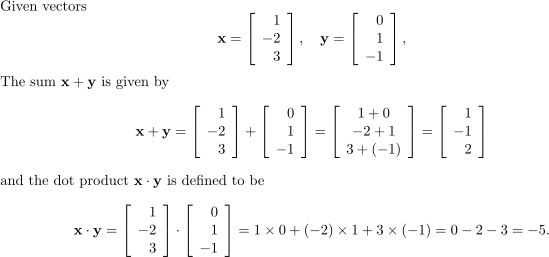
Use \cdot for the dot “\(\cdot\)” in the last equation.
Matrix Environments
The amsmath package provides a few environments that combine array with common delimiter pairs.
These environments are convenient, but they center each column and insert a little less spacing between the outside columns and the delimiters.