Page Elements
LaTeX supports standard page elements such as lists, images, and tables. The settings for each of these (for example, the amount of space between items in a bulleted list) can be configured, but here we cover just the basics.
Lists
The itemize environment creates a bulleted list, while enumerate creates a numbered list.
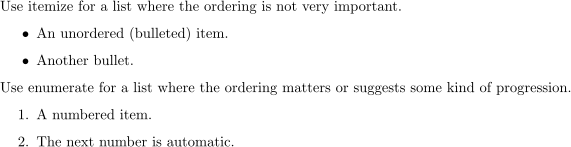
Use itemize for a list where the ordering is not very important.
\begin{itemize}
    \item An unordered (bulleted) item.
    \item Another bullet.
\end{itemize}
Use enumerate for a list where the ordering matters or suggests some kind of progression.
\begin{enumerate}
    \item A numbered item.
    \item The next number is automatic.
\end{enumerate}
Problem 8
Under Subsection 2.1 (Lists), make a list of your five favorite foods. If you have a strong ordering of preferences, use numbers; if you only have an unordered “top five,” use bullets.
Images
The graphicx package provides tools for inserting an image file into a LaTeX document.
On Overleaf, image files are uploaded by opening the file panel in the upper left corner and clicking the upload icon , or with File > New file > Upload.
After uploading an image, insert it into the document by adding \usepackage{graphicx} to the preamble and using \includegraphics{name-of-the-file} in the body.
This is enough to include the image, but it is often better to wrap the image in a figure environment, which provides a caption and creates an internal reference so the figure can be referred to later with \ref{}.
\begin{figure}[h]
    \centering
    \includegraphics[width=0.85\textwidth]{cosmo.png}
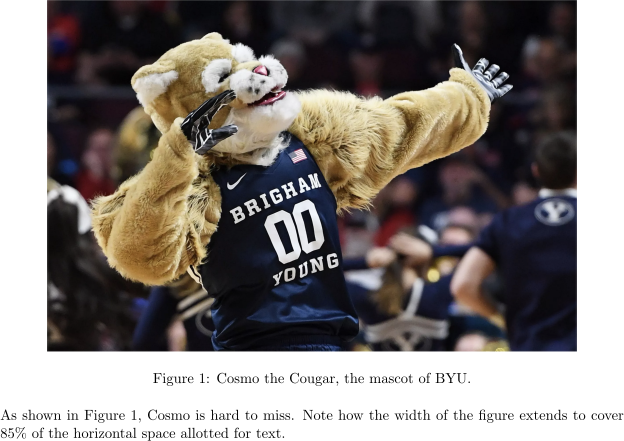
    \caption{Cosmo the Cougar, the mascot of BYU.}
    \label{fig:cosmo}
\end{figure}

As shown in Figure~\ref{fig:cosmo}, Cosmo is hard to miss.
Note how the width of the figure extends to cover $85\%$
of the horizontal space allotted for text.

The
[h]option requests that the figure be placed “here”, the place that thefigureenvironment appears in the source code. Afigureis a float, meaning LaTeX may shift its position to avoid awkward gaps. Alternatively,[t]requests placement at the top of a page.\centeringcenters the image horizontally.\includegraphics[width=...]{cosmo.png}inserts the image. Thewidthmay be absolute, such aswidth=5cm, or relative to the text width, such aswidth=0.5\textwidthfor half the text width.\caption{}prints a numbered caption beneath the image.\label{fig:cosmo}names the figure so that\ref{fig:cosmo}can print its number in the text. Always place\labelafter\caption.
Problem 9
Find a publicly available image of something from your hometown, download it to your computer, then upload it to your Overleaf project. Under Subsection 2.2 (Figures), insert a figure with the image. Set the image size to occupy 65% of the text width and add a brief descriptive caption.
Tables
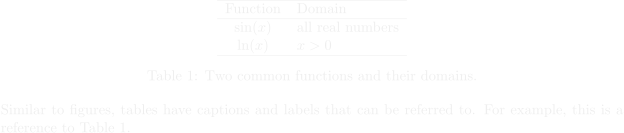
Tables in LaTeX are built with the tabular environment, which works like the array environment but outside math mode.
Wrap a tabular in a table environment to add a caption and label.
\begin{table}[h]
    \centering
    \begin{tabular}{cl}
        \hline
        Function & Domain \\
        \hline
        $\sin(x)$ & all real numbers \\
        $\ln(x)$  & $x > 0$ \\
        \hline
    \end{tabular}
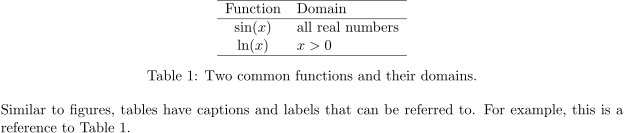
    \caption{Two common functions and their domains.}
    \label{tab:functions}
\end{table}

Similar to figures, tables have captions and labels that can be referenced.
For example, this is a reference to Table~\ref{tab:functions}.
Problem 10
Recreate the following table under Subsection 2.3 (Tables).
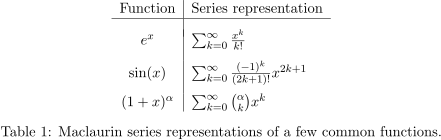
Hint: Use \\[.5em] or \\[.75em], etc., to specify the exact vertical spacing between rows (an em is a unit of measure related to the font size).
Definitions and Theorems
The amsthm package provides numbered environments for mathematical writing.
Theorem-like environments are declared in the preamble with \newtheorem{}{}.
\usepackage{amsthm}

\theoremstyle{plain}                % \newtheorem{} sets bold headings and italic body text.
\newtheorem{theorem}{Theorem}       % define a "theorem" environment with "Theorem" as the title.

\theoremstyle{definition}           % \newtheorem{} sets bold headings and upright body text.
\newtheorem{definition}{Definition} % define a "definition" environment entitled "Definition".
The theorem and definition environments can then be used in the body of the document.
\begin{definition}
    A number $n \in \mathbb{N}$ is called \emph{even}
    if there exists $j \in \mathbb{N}$ such that $n = 2j$.
\end{definition}

\begin{theorem}
    Every even number greater than $2$ is not prime.
\end{theorem}

\begin{proof}
    Let $n \in \mathbb{N}$ be an even number such that $n > 2$.
    Then there exists $j \in \mathbb{N}$ with $n = 2j$.
    Since $n > 2$, $j \neq 1$, so $n = 2j$ is a factorization of $n$
    and hence $n$ is not prime.
\end{proof}


Theorem-like environments each maintain their own counter by default (Definition 1, Theorem 1, Definition 2, …).
To share a counter (Definition 1, Theorem 2, Definition 3, …), use \newtheorem{theorem}{Theorem} as before, but define the next environment with \newtheorem{definition}[theorem]{Definition}.