Sets and Dictionaries
Ordered collections like tuples and lists are useful for tasks where the order of items matters.
For tasks where order is not important, the most common use of a collection is to enable quick membership checks of the form “is item x an element of collection y?”
In Python, the best tools for this scenario are the set and dict (dictionary) data types.
Sets
In mathematics, a set is an unordered collection of elements. For example, \(S = \{2, 4, 6\}\) is the set with elements \(2\), \(4\), and \(6\), and we write \(2 \in S\) to indicate “\(2\) is an element of \(S\).” The notation \(3 \notin S\) means “\(3\) is not an element of \(S\)”. The order of the elements in a set does not matter, so \(\{2, 4, 6\}\) is the same set as \(\{6, 2, 4\}\). Moreover, sets do not count elements more than once: \(\{1, 2, 2, 2, 2, 2, 3\}\) is the same set as \(\{1, 2, 3\}\).
The set type in Python mimics mathematical sets.
Matching the common mathematical notation, a Python set is written with curly braces {}, with items separated by commas.
numbers = {1, 2, 2, 2, 2, 2, 3}
print(numbers)
{1, 2, 3}
An iterable can be transformed into a set by calling set() like a function.
Because the elements of a set are not ordered, printing a set may not reproduce the order in which its elements were originally added.
multiples_of_2_or_3 = [2 * i for i in range(10)] + [3 * i for i in range(10)]
print(multiples_of_2_or_3)

# Turning an iterable into a set eliminates duplicates.
print(set(multiples_of_2_or_3))
[0, 2, 4, 6, 8, 10, 12, 14, 16, 18, 0, 3, 6, 9, 12, 15, 18, 21, 24, 27]
{0, 2, 3, 4, 6, 8, 9, 10, 12, 14, 15, 16, 18, 21, 24, 27}
word = "pneumonoultramicroscopicsilicovolcanoconiosis"

# Transforming a string into a set gives the set of unique characters.
letters = set(word)
print(letters)
print(len(word), len(letters))
{'a', 'l', 'p', 'o', 'm', 's', 'e', 'i', 't', 'c', 'v', 'n', 'r', 'u'}
45 14
Unlike tuples and lists, sets do not support indexing or slicing.
print(letters[0])
---------------------------------------------------------------------------
TypeError                                 Traceback (most recent call last)
Cell In[4], line 1
----> 1 print(letters[0])

TypeError: 'set' object is not subscriptable
The Empty Set
The empty set \(\emptyset = \{\,\}\) is the set with no elements.
An empty tuple can be created with
tuple()or().An empty list can be created with
list()or[].An empty set can only be created with
set().An empty dictionary (discussed later) can be created with
dict()or{}.
One common mistake is using {} for the empty set, but this is a dictionary! Use set() instead.
Membership
The in operator checks whether a value is an element of a set.
This is the counterpart of \(\in\).
The counterpart of \(\notin\) is not in.
S = {2, 4, 6}
print(2 in S)  # Is 2 an element of S?
print(3 in S)  # Is 3 an element of S?
print(100 not in S)  # Is 100 NOT an element of S?
True
False
True
This operation works by hashing: Python computes a numerical hash of the element and uses it to determine where to begin looking in a hash table. Equality checks resolve cases in which different elements lead Python to the same location. There are two important consequences of this: 1) membership tests are usually fast even for large sets, and 2) sets can only contain values that are hashable. Numbers (integers and floats), strings, and tuples of those are hashable; lists, sets, dictionaries, and tuples containing any of these are not. Therefore, sets cannot contain lists, sets, or dictionaries.
# A set CANNOT contain a list, set, or dictionary.
print({"A", 1, [2, 3]})
---------------------------------------------------------------------------
TypeError                                 Traceback (most recent call last)
Cell In[6], line 2
      1 # A set CANNOT contain a list, set, or dictionary.
----> 2 print({"A", 1, [2, 3]})

TypeError: unhashable type: 'list'
# A set CAN contain strings, numbers, and a tuple of numbers.
print({"A", 1, (2, 3)})
{(2, 3), 'A', 1}
Items In Lists
The in operator also works for lists and tuples as well as sets.
Due to hashing, this operation is typically much faster for sets (and dictionaries) than for the other data types.
Set Methods
Like a list, a set has methods for modifying its contents one operation at a time.
In this table, s represents a set.
Method |
Description |
|---|---|
Add |
|
Remove all elements from |
|
Copy |
|
Remove |
|
Remove and return an arbitrary element of |
|
Remove |
|
Add every element of the iterable |
# Start with an empty set.
paints = set()
print(paints)
set()
# Add a few elements to the set.
paints.add("Pewter")
paints.add("Cerulean")
paints.add("Vermilion")
paints.add("Lavender")
print(paints)

# Add several elements all at once.
paints.update(["Celadon", "Saffron", "Fuchsia"])
print(paints)
{'Cerulean', 'Vermilion', 'Lavender', 'Pewter'}
{'Pewter', 'Celadon', 'Cerulean', 'Saffron', 'Vermilion', 'Fuchsia', 'Lavender'}
# Remove a specified element.
paints.discard("Lavender")
print(paints)

# Remove an arbitrary element.
print(paints.pop())
print(paints)
{'Pewter', 'Celadon', 'Cerulean', 'Saffron', 'Vermilion', 'Fuchsia'}
Pewter
{'Celadon', 'Cerulean', 'Saffron', 'Vermilion', 'Fuchsia'}
Similar to lists, many of these methods change the set in place and return None.
Set Operations
Two mathematical sets \(A\) and \(B\) can be combined to form new sets using the following set operations.
If every element of \(A\) is also an element of \(B\), then \(A\) is a subset of \(B\), written \(A \subseteq B\). Finally, if \(A \subseteq B\) and \(B \subseteq A\), then we say \(A = B\).
Python sets support these set operations with arithmetic operators and methods.
In the following table, A and B are Python sets representing mathematical sets \(A\) and \(B\), respectively.
Notation |
Syntax |
Method |
Description |
|---|---|---|---|
\(A \cup B\) |
|
Return a new set with all elements in |
|
\(A \cap B\) |
|
Return a new set with elements in both |
|
\(A \setminus B\) |
|
Return a new set with elements from |
|
\(A \subseteq B\) |
|
Return |
|
\(A \supseteq B\) |
|
Return |
|
\(A = B\) |
|
Return |
With the operator syntax, both operands must be Python sets; with method syntax, the argument B may be any iterable.
A = {1, 2, 3}
B = {3, 4}

print(A | B)  # Union.
print(A & B)  # Intersection.
print(A - B)  # In A but not in B.
print(B - A)  # In B but not in A.
print(A <= B)  # A is not a subset of B.
print({1, 2} <= A)  # Every item of {1, 2} is in A.
{1, 2, 3, 4}
{3}
{1, 2}
{4}
False
True
Set Comprehension
Sets can also be constructed with comprehension syntax, similar to lists.
The only difference is that sets use curly braces {} instead of square brackets [].
# Set comprehension: the set of all remainders when dividing 0, 1, ..., 9 by 3.
print({x % 3 for x in range(10)})

# Set comprehension: the set of squares x^2 where x = 0, 1, 2, ..., 9 and is even.
print({x**2 for x in range(10) if x % 2 == 0})
{0, 1, 2}
{0, 64, 4, 36, 16}
Problem 4
If \(a\) and \(b\) are integers, we say that \(a\) divides \(b\) if there exists an integer \(c\) such that \(b = ac\). In other words, \(a\) is a divisor of \(b\), and we write \(a | b\) to mean “\(a\) divides \(b\).”
Implement the following.
A function named
divisors()that accepts a positive integer \(n\) and returns the set of positive integers that are divisors of \(n\) (including 1 and \(n\)).A function named
common_divisors()that accepts two positive integers \(m\) and \(n\) and returns the set of positive integers that are divisors of both \(m\) and \(n\).
Hint: An integer \(a\) is even if \(2 | a\), meaning \(\frac{1}{2}a\) is an integer, that is, \(a \div 2\) has remainder zero. Likewise, \(3|a\) if \(a \div 3\) has remainder zero.
Test Cases
In the following tests, keep in mind that the elements of a set may print in any order.
print(divisors(20))
print(divisors(99))
print(divisors(1829389))
{1, 2, 4, 5, 10, 20}
{1, 33, 3, 99, 9, 11}
{1, 1829389}
print(common_divisors(12, 9))
print(common_divisors(10, 50))
print(common_divisors(108, 36))
{1, 3}
{1, 2, 10, 5}
{1, 2, 3, 4, 36, 6, 9, 12, 18}
Dictionaries
In mathematics, a function \(f\) is a well-defined relation, meaning a collection of input-output pairs \((a,b)\) such that each input \(a\) is paired with exactly one output \(b\). The notation \(f(a) = b\) indicates that \((a,b)\) is an input-output pair for \(f\).
Python functions (declared with def) generalize the notion of a function, but the concept of a strict input-output mapping is emulated by the dict data type, which stands for dictionary.
A dictionary stores key-value pairs: each key is an input, and the value stored under it is the corresponding output.
Keys serve as the “indices” for a dictionary and are used to extract or assign values.
A dict is written with curly braces {} with key-value pairs separated by commas and a colon between each key and its value.
The presence of colons distinguishes a dictionary from a set.
# Create a dictionary with three key-value pairs.
ages = {"Alice": 30, "Bob": 25, "Carol": 25}
print(ages)

# Extract the value associated with the key "Bob".
print(ages["Bob"])
{'Alice': 30, 'Bob': 25, 'Carol': 25}
25
Dictionary keys act like a set: there are no repeated keys, and only hashable values are allowed to be keys. Values, on the other hand, need not be hashable, and values associated with different keys may be equal.
# Keys may be numbers, strings, or tuples of these. Values can be anything.
info = {
    3.14: "first three digits",
    "A": [1, 2, 3, 4],
    (0, 0, 1): {0, 1},
    2.78: "first three digits",
}
print(info)
{3.14: 'first three digits', 'A': [1, 2, 3, 4], (0, 0, 1): {0, 1}, 2.78: 'first three digits'}
Looking up a key that does not exist results in an error.
info[0]
---------------------------------------------------------------------------
KeyError                                  Traceback (most recent call last)
Cell In[15], line 1
----> 1 info[0]

KeyError: 0
New key-value pairs are added, and existing ones updated, by assigning to a key.
# Start with an empty dictionary.
ages = {}

# Add key-value pairs to the dictionary.
ages["Alice"] = 30
ages["Bob"] = 25
ages["Carol"] = 25
print(ages)
{'Alice': 30, 'Bob': 25, 'Carol': 25}
The in operator tests whether something is a key in a dictionary.
Values are not checked.
print("Alice" in ages)
print(25 in ages)
True
False
Quick Check
Describe the following code.
letters = "awneiaoweiavsdoifanweoivanwodvaiweonfinawoefa"
counts = {}
for abc in letters:
    if abc not in counts:
        counts[abc] = 0
    counts[abc] += 1
Answer
The dictionary counts is keeping track of the number of times that each character occurs in the string letters.
The line if abc not in counts checks whether abc is a key in the dictionary yet. If it is not a key, counts[abc] = 0 adds the current letter to the dictionary as a key with value 0.
Then counts[abc] += 1 looks up the value for the key abc, increments it by one, and overwrites the value with the result.
Problem 5
A graph is a set of nodes (also called vertices) together with a set of connections between nodes, called edges. In a directed graph, the edges point from one node to another with a specific direction. The following figure shows a directed graph with nodes \(\{A,B,C,D,E\}\) together with the edges \(\{(A,B), (B,C), (C,D), (D,A), (E,C)\}\), in which \((X,Y)\) means there is an edge from node \(X\) to node \(Y\).
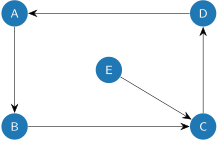
A directed graph where each node has exactly one edge leading away from it, such as the graph shown above, is called a functional graph. A dictionary is a natural data structure for representing a functional graph:
Each key in the dictionary defines a node.
Each value in the dictionary is one of the nodes.
Key-value pairs \((X,Y)\) represent an edge from node \(X\) to node \(Y\).
For example, the graph shown above can be represented with the following dictionary.
graph = {"A": "B", "B": "C", "C": "D", "D": "A", "E": "C"}
A path between two nodes \(X\) and \(Y\) is an ordered sequence of nodes that traverses the graph edges from node \(X\) to node \(Y\). In the above graph, the path from node \(A\) to node \(D\) is \((A, B, C, D)\), while the path from \(E\) to \(B\) is \((E,C,D,A,B)\).
Write a function named get_path() that accepts a dictionary representing a functional graph, a starting node \(X\), and an ending node \(Y\).
Return the path from node \(X\) to node \(Y\), including both endpoints, as a list.
Account for the following special cases:
If the starting and ending nodes are the same (\(X = Y\)), return a single-item list [\(\,X\,\)].
If, after leaving the starting node \(X\) but before finding the ending node \(Y\), the path arrives back at a node that is already in the path, then there is no path between \(X\) and \(Y\); return
-1in this case.
You may assume that the starting and ending nodes are both in the graph (keys in the dictionary).
Test Cases
graph = {"A": "B", "B": "C", "C": "D", "D": "A", "E": "C"}

print(get_path(graph, "A", "D"))
print(get_path(graph, "E", "B"))
print(get_path(graph, "C", "C"))
print(get_path(graph, "A", "E"))
['A', 'B', 'C', 'D']
['E', 'C', 'D', 'A', 'B']
['C']
-1
graph = {
    "A": "G",
    "B": "H",
    "C": "B",
    "D": "A",
    "E": "H",
    "F": "H",
    "G": "B",
    "H": "J",
    "I": "E",
    "J": "D",
}
print(get_path(graph, "A", "D"))
print(get_path(graph, "E", "B"))
print(get_path(graph, "A", "F"))
['A', 'G', 'B', 'H', 'J', 'D']
['E', 'H', 'J', 'D', 'A', 'G', 'B']
-1
The Collatz sequence from Problem 1 can be thought of as a functional graph by treating \(1\) as a terminal node with a self-loop.
collatz = {
    1: 1,
    2: 1,
    3: 10,
    4: 2,
    5: 16,
    6: 3,
    8: 4,
    10: 5,
    12: 6,
    16: 8,
    20: 10,
    24: 12,
}

print(get_path(collatz, 3, 1))
print(get_path(collatz, 24, 1))
[3, 10, 5, 16, 8, 4, 2, 1]
[24, 12, 6, 3, 10, 5, 16, 8, 4, 2, 1]
Dictionary Methods
A dict has methods for modifying its contents and iterating over its contents.
In this table, d represents a dictionary.
Method |
Description |
|---|---|
Remove all key-value pairs from |
|
Copy |
|
Return the value stored under |
|
Return a set-like view of key-value pairs in |
|
Return a set-like view of the keys in |
|
Remove |
|
Add every key-value pair of the dictionary |
|
Return a view of the values of |
A for loop over a dictionary visits its keys.
To get the key and its value at the same time, loop over items() and unpack each key-value pair into two variables.
ages = {"Alice": 30, "Bob": 25, "Carol": 25}

# Loop through the keys only.
for key in ages:
    print(key)
Alice
Bob
Carol
# Loop through both the keys and the values.
for key, value in ages.items():
    print(key, value)
Alice 30
Bob 25
Carol 25
Dictionary Comprehension
Like lists and sets, dictionaries can be constructed through comprehension.
The syntax uses curly braces {} with a colon separating the expression for the key from the expression for the value.
print({n: n**2 for n in range(10)})
{0: 0, 1: 1, 2: 4, 3: 9, 4: 16, 5: 25, 6: 36, 7: 49, 8: 64, 9: 81}
print({n: n**2 for n in range(10) if n % 2 == 0})
{0: 0, 2: 4, 4: 16, 6: 36, 8: 64}
Problem 6
Suppose a university collects data from each student about the courses they want to sign up for, and that the data are gathered into a dictionary mapping student names (keys) to the set of their desired courses (values). The university staff must then “invert” the dictionary to find, for each course (new keys), the set of students signing up for that course (new values), called the roster.
Write a function named course_rosters() that accepts a dictionary of student schedules and returns the corresponding dictionary of course rosters.
Hint 1: It is possible to implement this function with dictionary and set comprehensions. However, this may be one case where a comprehension is more trouble than it is worth.
Hint 2: If a particular course is not yet a key in the dictionary of rosters, add it as a key whose value is (initially) an empty set().
Test Cases
In the following tests, keep in mind that the elements of a set may print in any order.
schedules = {
    "A": {"X", "Y", "Z"},
    "B": {"X", "Y"},
    "C": {"Y", "Z"},
}

rosters = course_rosters(schedules)
for key, value in rosters.items():
    print(key, value)
Z {'C', 'A'}
X {'A', 'B'}
Y {'C', 'A', 'B'}
schedules = {
    "Abby": {"cs580", "math213", "math215", "math290", "phscs530"},
    "Bryn": {"math213", "math215", "math290", "stat538", "stat666"},
    "Caleb": {"cs580", "math290", "phscs530", "stat538"},
}

rosters = course_rosters(schedules)
for key, value in rosters.items():
    print(key, value)
math290 {'Abby', 'Bryn', 'Caleb'}
math215 {'Abby', 'Bryn'}
phscs530 {'Abby', 'Caleb'}
math213 {'Abby', 'Bryn'}
cs580 {'Abby', 'Caleb'}
stat666 {'Bryn'}
stat538 {'Bryn', 'Caleb'}